GeoWorks3D

3D design software made for 3D printing

Draw a sketch, turn it into a solid, and send it to your printer. GeoWorks3D is a Windows program that keeps the steps simple and checks your part before you print it.

Buy GeoWorks3DTry it free for 14 days

Windows 10 or 11. One-time purchase. 14-day refund.

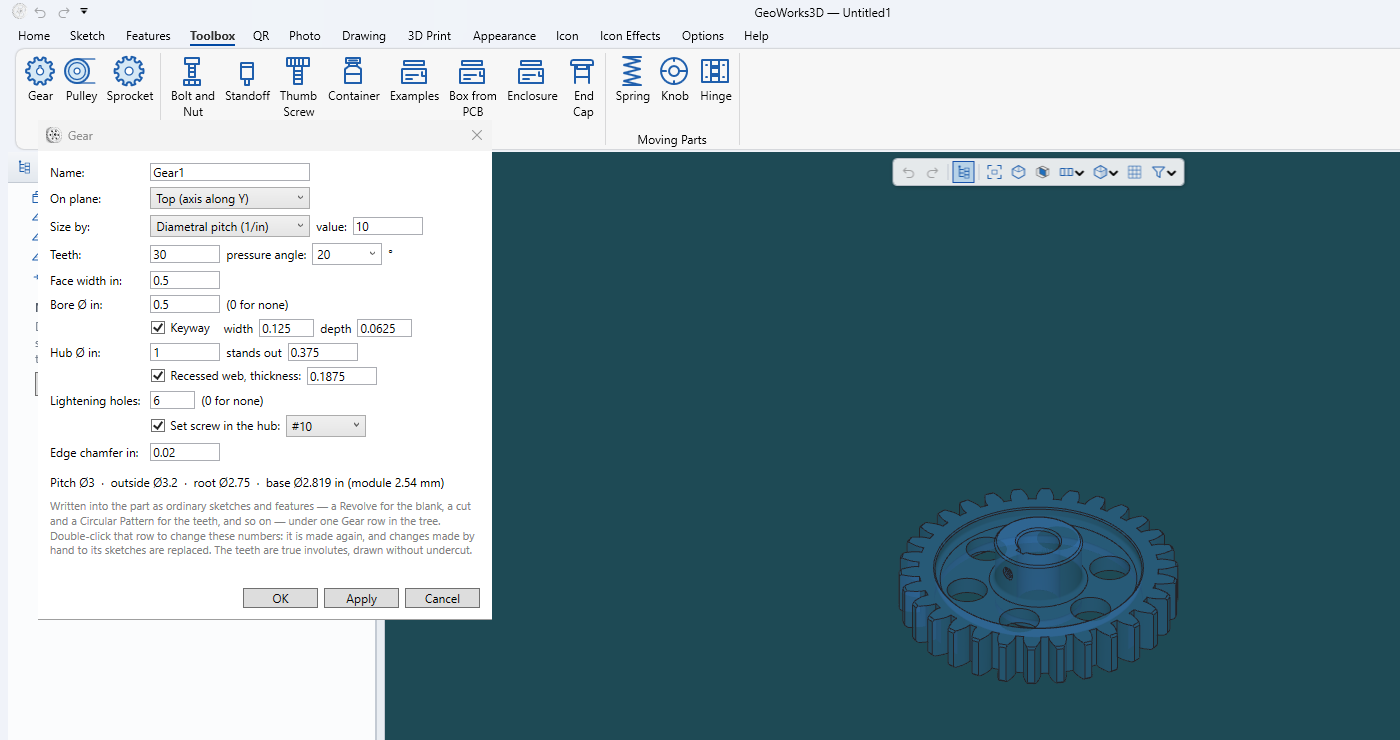
GeoWorks3D with the Gear tool open: a spur gear with 30 teeth, a keyway, lightening holes and a set screw is shown beside the tool's settings.
The Gear tool: choose the teeth, bore, keyway and more, and the gear appears as you type.

What you can do with it

Everything below is in the program today.

Sketch with real constraints

Lines, arcs, circles, splines and text, held in place with relations and dimensions that stay right when you change a number.

Turn sketches into solids

Extrude, revolve, sweep, loft, rib, shell, fillet, chamfer, draft, threads and knurling, with a feature tree you can edit and roll back.

Ready-made parts

Gears, pulleys and sprockets, springs, hinges, bolts and nuts, thumb screws, containers, end caps, and electronics enclosures with openings for ports and vents.

Made for printing

Print Check finds overhangs and thin walls. Fit settings adjust holes and outer sizes for your printer. Split big parts to fit the bed.

Photos to 3D

Turn a photo into a relief plaque or a lithophane, or build a 3D shape from one or several pictures.

QR plaques and signs

Make QR code plaques and stands with text and symbols, and test that they still scan.

Works with your other files

Open and save STL, 3MF and STEP. Open 3D scans (PLY and OBJ) and clean them up. Send a part straight to your slicer.

Assemblies and drawings

Put parts together with mates, check how they fit, and make 2D drawings with dimensions and a parts list.

Yours to keep

Your designs are saved as ordinary files on your own computer. Nothing is uploaded, and there is no subscription.
Try it free for 14 days

Everything works during the trial, saving and exporting included. After 14 days you can still open and look at your designs, and a licence lets you save and export again.

Download for Windows

The download link will appear here when the first release is ready.

One price, yours to keep

Pay once. No subscription.

GeoWorks3D licence
  • Everything in the program
  • Works on one computer at a time, and you can move it to another whenever you like
  • Your licence key arrives by email straight after you pay
  • 14-day money-back refund, no questions asked
Buy now

Payment and sales tax are handled by our payment partner, Lemon Squeezy.

After you buy: activate your licence

  1. Open GeoWorks3D and choose Help, then Licence (or click the licence line at the bottom of the window).
  2. Type the key from your email, like GW3D-ABCD-EFGH-JKMN-PQRS, and press Activate.
  3. That is all. The program renews its permission quietly in the background, and keeps working for a week if you are offline.

Changing computers? Choose Move to another computer in the same window, then activate on the new one. Activating on a second computer also takes the licence over from the first.

Questions?

Email support@geoworks3d.com and include your licence key if the question is about it. See also the refund policy.